
Short answer:
- Shopify store: already in, if the store is eligible.
- Etsy store: already in, with nothing to set up.
- Any other platform: apply to OpenAI at chatgpt.com/merchants.
- Every store: make sure your site doesn’t block ChatGPT.
- To get picked more often: complete product data, and reviews and mentions on other sites.
Getting your products into ChatGPT Shopping mostly depends on where your store runs. Etsy stores and eligible Shopify stores are already connected to ChatGPT, and stores on other platforms apply to OpenAI.
Getting ChatGPT to choose your products is the harder part. It depends on how well your product information answers what the shopper asked, and on what other websites say about your products. findanseoagency.com read OpenAI’s, Shopify’s, and Google’s merchant documentation as of November 2026, and none of it offers a shortcut for this part.
How do products get into ChatGPT Shopping?
As of November 2026, shopping in ChatGPT is live for users in the U.S., and OpenAI says it plans to expand to more merchants and regions over time. Products reach it in three ways:
- A platform integration. Etsy catalogs and eligible Shopify catalogs are already connected to ChatGPT. For Shopify stores, the connection runs through Shopify Catalog, the product data Shopify sends to AI assistants on its merchants’ behalf.
- A direct feed. Stores on other platforms can apply to send OpenAI their product list, called a product feed.
- The open web. ChatGPT also reads product pages on its own, the way a search engine does, by sending a program called a crawler to visit them. It also gets product data from companies OpenAI calls “third-party providers,” which it doesn’t name.
Etsy sellers have nothing to set up or check. OpenAI’s merchant page says that for Shopify and Etsy sellers, “your catalog is already integrated, and no additional setup or application is required.” What an Etsy seller can still improve is the listings themselves, through their titles, descriptions, and photos, and the reviews their products collect.
Being in any of these makes a product eligible to appear. It doesn’t mean the product will appear. OpenAI’s shopping help page says that not all available products will necessarily be shown. Which of the eligible products ChatGPT shows is decided separately, each time a shopper asks a question, and that choice is where a store has the most work to do.
How to check if your Shopify products are already in ChatGPT
If your store is on Shopify, there is nothing to apply for or install. Shopify’s ChatGPT help page says: “You don’t need to do anything for your products to be discovered by ChatGPT through Shopify Catalog.” What you do need to check is whether your store is eligible, because an ineligible store has no products in Shopify Catalog at all.
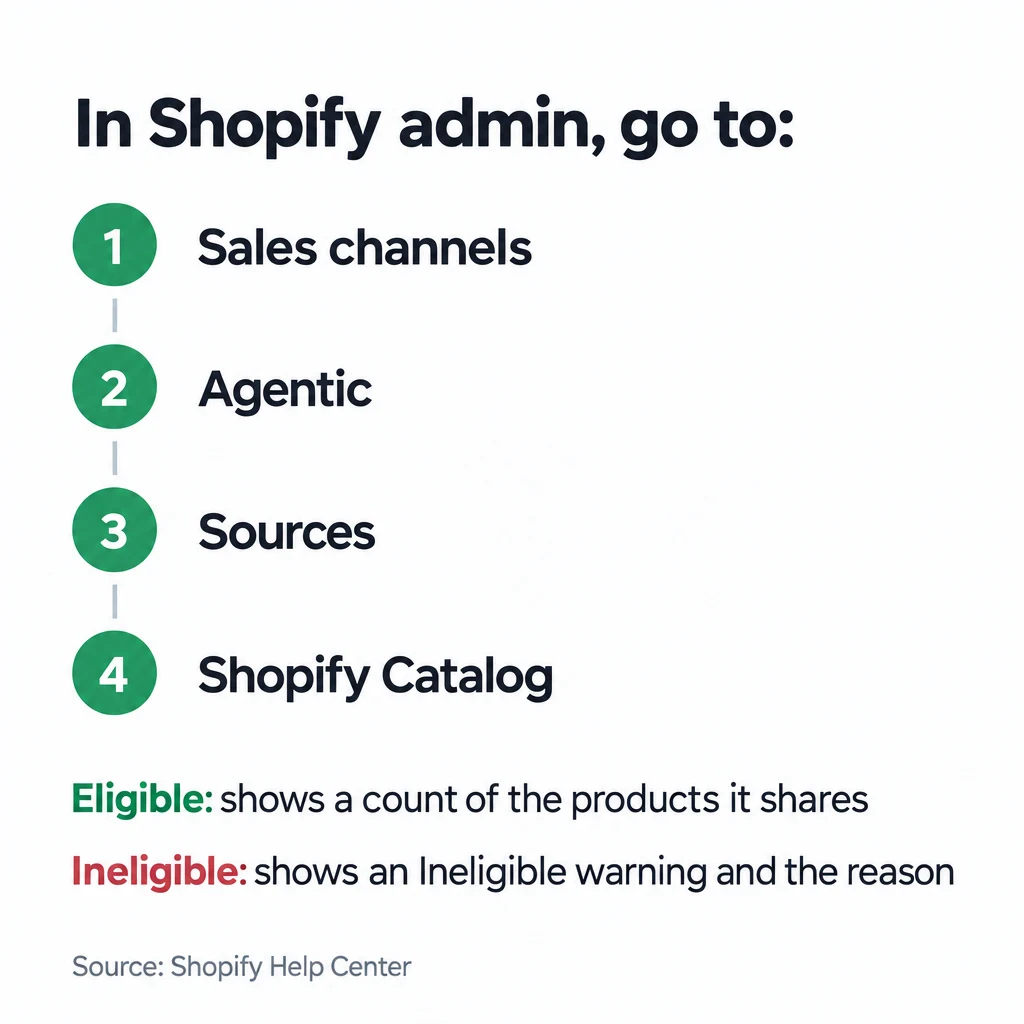
To check, open Shopify admin and go to Sales channels > Agentic > Sources > Shopify Catalog. An eligible store shows a count of the products it shares. An ineligible store shows an Ineligible warning, and clicking it shows the reason.
Why a Shopify store or product isn’t eligible
Shopify decides eligibility at two levels: the store and each product. Its requirements page sets out both.
The store has to meet these conditions:
- It is on the Starter plan or higher.
- It isn’t in private mode, which is what Shopify calls a password-protected store.
- It doesn’t sell only to business customers.
- The Shopify account is in good standing.
The plan, the password, and who you sell to are settings you can change today. Account standing is different: Shopify says it “is based on a number of factors, and is reviewed over time,” and part of it is an operating history that only builds with time. Shopify asks you to:
- “Maintain a track record of genuine sales to real customers through your usual sales channels.”
- Fulfill orders promptly and accurately.
- Keep your chargeback rate low.
- Pay your Shopify invoices on time.
- Verify your email, turn on two-step authentication, and complete identity and business verification when Shopify prompts you.
A store with little sales history may not qualify yet.
Each product also has to meet these conditions:
- It has a title, at least one image, and a price greater than zero. Free products are left out.
- It is published to your online store (or a Hydrogen or headless storefront), with an identifiable product URL.
- It isn’t set to Unlisted or hidden from search engines.
- It doesn’t contain sensitive content, such as mature content, in its images or description.
- It isn’t in an excluded category.
As of November 2026, the excluded categories include:
- Alcohol, including homebrewing supplies
- Tobacco and vaping
- CBD supplements and smoking accessories
- Prescription and medical products
- Weapons and ammunition
- All hunting and shooting products, including archery, airsoft, and paintball gear, and toy weapons
- Fireworks
- Lab products and hazardous materials, including fire extinguishers and firewood
- Adult products, and sexual health and wellness products
- Bullion and collectible coins, and prop money
- Services and add-ons, such as extended warranties, installation, and subscriptions
- Event tickets
- Live animals
- Uncategorized products
Shopify sorts products into these categories by reading the product’s own information, such as its title and description, not the category you picked in your admin. A product you categorized as a toy can still be excluded as a toy weapon if its description reads like one.
How to get products into ChatGPT if you’re not on Shopify
Stores on other platforms apply for a direct feed on OpenAI’s merchant page. The form asks about your company, your product category, and how many unique products (SKUs) you sell. Applications go to a waitlist: the page tells applicants, “If you’ve already applied, you’re on the waitlist.” OpenAI also says it is building a self-service portal where merchants could connect their product data themselves, and that it aims to launch it “later this year.” As of November 2026, the portal hasn’t launched and OpenAI hasn’t given a date.
Once approved, you send the feed as a file upload, through an API, or through a commerce platform or feed app. OpenAI lists “SFTP, APIs, and leading commerce platforms and feed providers.” The feed has one row per product variant, and each row needs nine fields:
- An ID
- Title
- Description
- Product URL
- Brand
- Seller name
- Image URL
- Availability
- Price
OpenAI asks for a real brand and seller name rather than placeholders.
Shopify’s Agentic plan is another way in that doesn’t involve the waitlist. It puts your products into Shopify Catalog without a Shopify online store, which connects them to ChatGPT the same way a Shopify store’s products are. Shopify lists it with “no monthly fee” and card rates “from 2.9% + 30¢ USD online.”
Do you need a product feed if ChatGPT already crawls your site?
A product feed isn’t required, because ChatGPT can find products by crawling your site. OpenAI answers this exact question on its merchant page: “No, but feeds give you greater control over how your products appear, helping ensure more accurate and up-to-date information.” Without a feed, ChatGPT works from what it reads on your product pages and what it gets from third parties, and that information can lag behind your store. OpenAI’s help page warns that when merchants change prices or shipping terms, “there may be some delay before it is reflected in the information you see.”
Could your site be blocking ChatGPT from seeing your products?
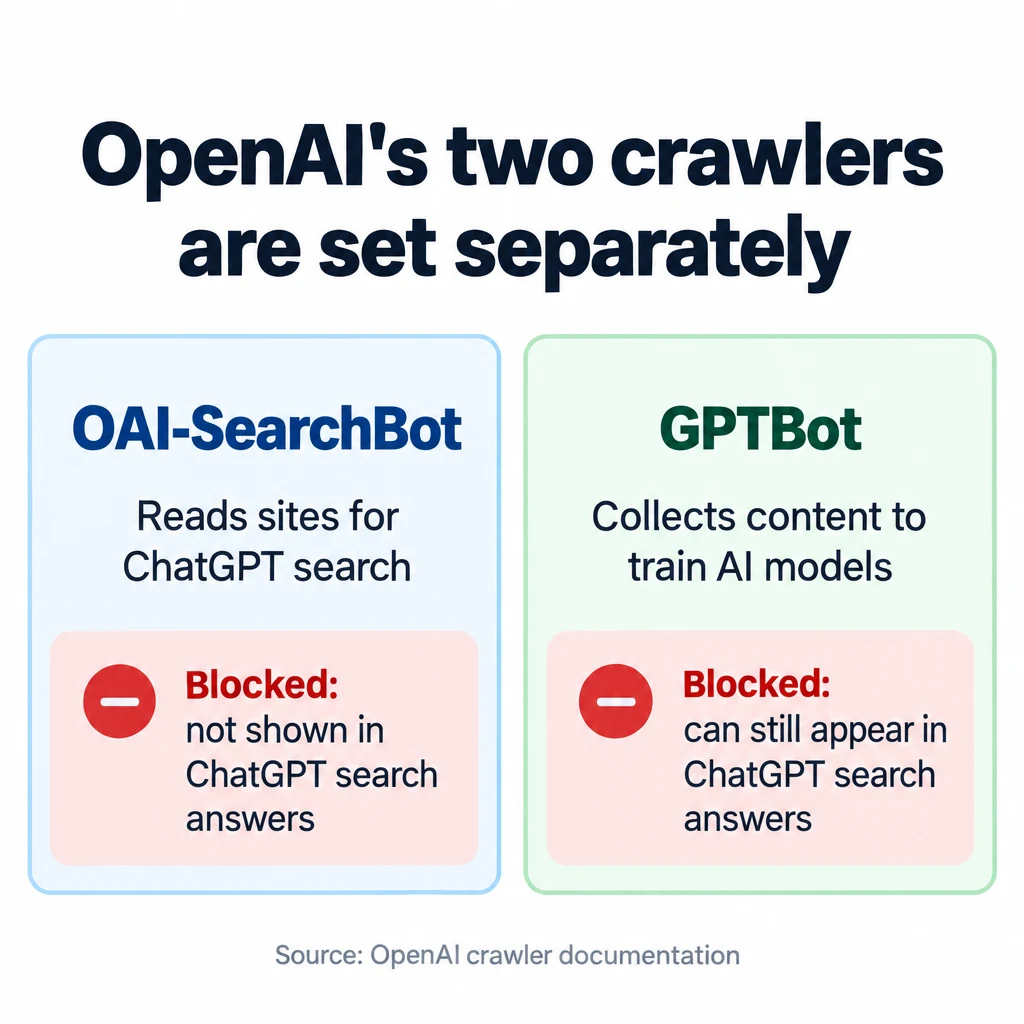
A store’s own site settings can keep its pages out of ChatGPT’s search answers. That matters most for stores relying on the open web to get in, and it also limits what ChatGPT can read on your pages beyond your catalog or feed. OpenAI reads websites with a crawler called OAI-SearchBot. OpenAI’s crawler documentation says: “Sites that are opted out of OAI-SearchBot will not be shown in ChatGPT search answers, though can still appear as navigational links.”
The usual way a site opts out is its robots.txt file, a short public text file at yourstore.com/robots.txt that tells crawlers which pages they may visit. OpenAI also runs a second crawler, GPTBot, which collects content to train its AI models. The two are set separately, so a store can keep its content out of training and still appear in ChatGPT’s search results. A robots.txt file that does that includes these lines:
User-agent: OAI-SearchBot
Allow: /

User-agent: GPTBot
Disallow: /
A rule that blocks every OpenAI crawler, or every crawler, blocks ChatGPT search too. OpenAI says a change to robots.txt takes about 24 hours to reach its systems.
On Shopify, every store gets a default robots.txt file, and Shopify says it works for most stores. Changing it means adding a robots.txt.liquid template in your theme’s code editor, and Shopify recommends working with a Shopify Partner or someone experienced in code and SEO to do it. You can see what your current file says by opening yourstore.com/robots.txt in a browser.
Some sites also run a firewall or bot-protection service that can turn crawlers away. If yours does, check that it lets OAI-SearchBot in. OpenAI publishes the list of IP addresses its crawler uses, so you can give that list to the service and allow those addresses. Product pages and images also need to be publicly reachable, without a login. The guide to getting cited by AI search engines walks through crawler access in more detail.
Some guides also tell stores to add Product schema (code in a page that labels its price, brand, and other details for machines) or an llms.txt file (a text summary of a site written for AI tools). No OpenAI or Shopify page names either one as a way into ChatGPT Shopping. Shopify already creates llms.txt and agents.md files for AI tools on every store automatically. Because Shopify serves these files itself, you don’t need an app to make them. Google says the same about its AI features, including AI Mode: “You don’t need to create new machine readable files, AI text files, or markup to appear in these features,” according to its guidance on AI features.
How does ChatGPT decide which products to show?
ChatGPT starts from the shopper’s question and what it knows about them, such as saved Memory and custom instructions. OpenAI’s example in its shopping help page is a shopper asking for goofy dog costumes, where “ChatGPT may consider available options, price, reviews, and ease of use, as well as any other context you provide.”
To choose among the products that fit, OpenAI says ChatGPT considers:
- “Structured metadata from first-party and third-party providers (e.g., price, product description) and other third-party content.” In plain terms, this is your product data, product data about you from other sources, and what other websites say about your products.
- “Model responses generated by ChatGPT before it considers any new search results.” This is what ChatGPT already knows before it searches, which it learned partly from content that is publicly available online.
- “OpenAI safety standards and product policies,” which keep some products out entirely.
A second ranking applies when several stores sell the same product. OpenAI says “merchants are ranked based on factors like availability, price, quality, and whether they are the maker or primary seller of that item.” For a store that resells other brands’ products, that means the brand’s own store may be listed first. The other factors OpenAI names (availability, price, and quality) are where a reseller can compete.
Why does ChatGPT recommend competitors’ products and not mine?
Once your products are listed, ChatGPT may still pick a competitor’s products. Of the inputs OpenAI lists, two are ones a store can work on. The competitor’s product data may answer the shopper’s question better, or more websites may write about the competitor’s products. The second is hard for a small store to match, because big brands have far more reviews and coverage.
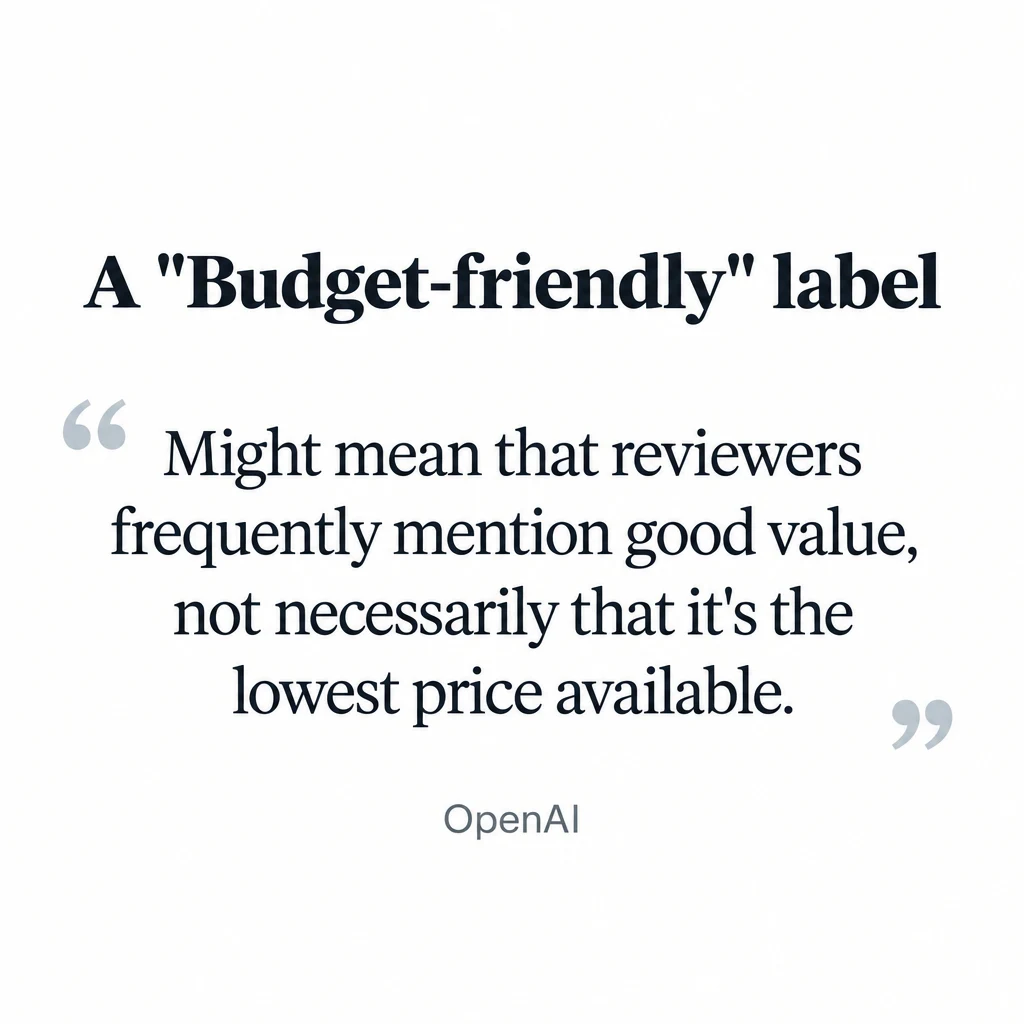
What other websites say shows up directly on the product cards, the boxes ChatGPT shows for each product. OpenAI says ChatGPT writes labels for those cards, such as “Budget-friendly,” from information that may include third-party data. A “Budget-friendly” label, for example, “might mean that reviewers frequently mention good value, not necessarily that it’s the lowest price available.” The review summaries on the cards “are based on reviews from public websites and are intended to highlight common user likes and dislikes about a product.”
What to change in your product data
Product data is the part you control completely, and Shopify says its fields affect how products rank on AI platforms. Its list of the fields AI platforms consider gives you the checklist:
- Title: say what the product is in plain words. OpenAI’s feed specification asks for concise titles of at most 150 characters.
- Description: answer the questions a shopper would ask about this product, such as materials, sizes, fit, what it works with, and who it suits. A shopper asking ChatGPT for a waterproof hiking boot with a wide toe box is more likely to be matched to your boot if your description says it has one.
- Images, type, vendor, collections, and tags: fill them all in. Empty fields give ChatGPT less to match.
- Barcode (GTIN, UPC, or ISBN): add it wherever your products have one.
- Variants: use clear option names, such as “Size” and “Color.” Shopify also lets you group separate products that are really variants of one item so they appear as a single listing.
- Legal disclosures: Shopify asks you to put any relevant legal disclosures in the first 6,000 characters of the description.
Shopify also says complete terms, privacy, and return policies let AI assistants answer a shopper’s question about returns with the correct information. Shopify’s summary of its own advice is to focus on “complete and well-structured product information in Shopify Catalog, and on following SEO best practices.”
Do reviews matter for ChatGPT Shopping?
Reviews and mentions on other websites matter, and the ones that count are on the sites ChatGPT already reads for your category: review sites, comparison articles, best-of lists, and discussion threads. The guide to getting recommended by AI search explains how to earn those mentions.
Does it cost anything to be in ChatGPT Shopping?
Being listed in ChatGPT Shopping is free. OpenAI’s merchant page says “there are no fees on purchases that start in ChatGPT,” and Shopify says you pay only your standard payment processing fees.
You also can’t pay for a place in the regular, unpaid product results. OpenAI says they “are selected independently by ChatGPT and are not ads, nor influenced by any OpenAI partnerships.” ChatGPT Ads is a separate paid product: ads appear below ChatGPT’s answer, and advertisers can build them from a product feed. OpenAI says “ads do not influence ChatGPT’s answers,” so buying ads does nothing for your unpaid listings.
Can shoppers buy inside ChatGPT?
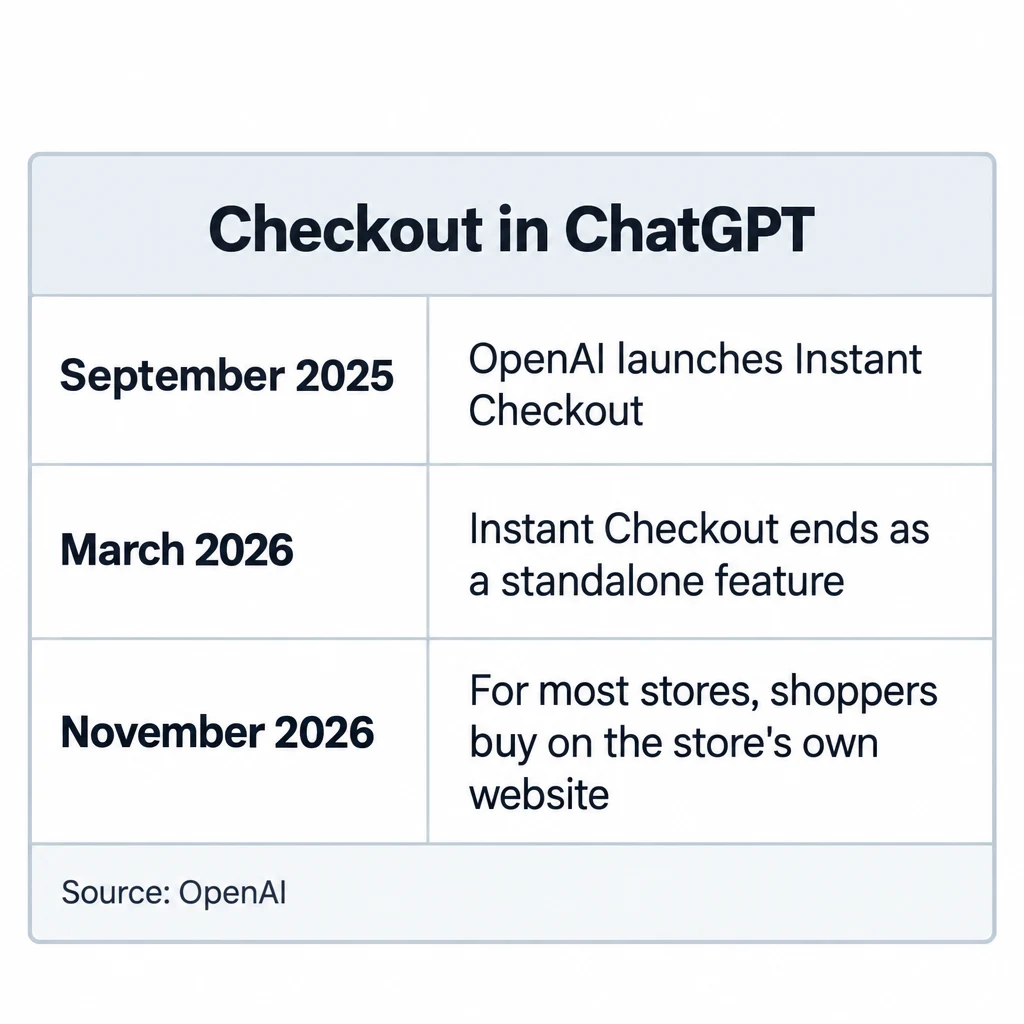
Shoppers can find and compare products in ChatGPT, but for most stores, as of November 2026, they buy on the store’s own website. OpenAI launched an in-chat checkout called Instant Checkout in September 2025. In March 2026 it ended Instant Checkout as a standalone feature and let merchants use their own checkout instead, saying “we’re allowing merchants to use their own checkout experiences while we focus our efforts on product discovery.” For Shopify stores, the store’s checkout opens in ChatGPT’s in-app browser or in a new tab, and there is no checkout setting to turn on.
Some older guides still tell merchants to apply for Instant Checkout or build a checkout integration. Neither is needed to be listed.
How to get products into Google AI Mode and Gemini
Google AI Mode and Gemini don’t use OpenAI’s routes. Their product listings come from Google Merchant Center. Shopify’s Google AI Mode help page says: “Your products must be available in Google Merchant Center to be discoverable.” On Shopify, the Google & YouTube channel syncs your products and shipping to Merchant Center automatically. On other platforms, you send Merchant Center a product feed. Google’s own advice is to keep your Merchant Center information up to date.
Can you get your products into Perplexity shopping?
Perplexity sells products too, with checkout through PayPal for U.S. users. The only way in it has documented is an interest form from 2024 meant for large retailers, which is still online but comes with no published terms. For other stores there is no published application as of November 2026. The work that helps with ChatGPT’s crawler applies here as well: product pages Perplexity can read, and products other websites write about.
How to tell whether your products show up in ChatGPT and bring sales
Shopify’s admin shows how a store’s products perform in ChatGPT and other AI assistants. The Agentic page lets you, in Shopify’s words, “track performance across all major AI channels, see which queries you rank for, and get recommendations to improve your product data.”
If you use Google Analytics 4, visits from ChatGPT have their own channel in the Acquisition reports, called AI Assistant. Google’s channel definitions say it counts visitors who arrive “from sources like ChatGPT, Gemini, Deepseek, Copilot, or Grok.” Visits from Google’s AI Overviews and AI Mode are not counted in it.
For Google, Merchant Center’s AI performance insights report (under Analytics > Products) shows how often your brand appears in Google’s AI answers compared with a set of competitors that Merchant Center defines. As of November 2026 it covers English-language queries in Australia, Canada, India, New Zealand, and the U.S.
You can also ask ChatGPT the shopping questions your customers would ask. Run a set of them, more than once. A single answer proves little either way, because results change with each shopper’s context and memory.
Can an agency get your products into ChatGPT Shopping?
Eligible Shopify stores are in ChatGPT automatically, and you can check your store’s eligibility yourself in a few minutes. Paying an agency for that step alone means paying for something Shopify already does.
An agency can do real work on the rest: rewriting product titles and descriptions across a large catalog, setting up feeds and the OpenAI application for a store not on Shopify, finding crawler or firewall blocks, connecting Merchant Center for Google AI Mode, and earning the reviews and mentions ChatGPT reads. 1Digital Agency, an e-commerce SEO agency, lists an “Agentic Commerce” service on its homepage aimed at ChatGPT Shopping. No agency can buy or promise a place in the unpaid results, so an agency that promises a position is describing what it hopes will happen.
Shopify SEO apps cover some of this work too, and the comparison of Shopify SEO apps and agencies sets out which suits which store. If you decide the product data and reputation work is worth outsourcing, findanseoagency.com’s guide to choosing an e-commerce SEO agency explains what that work costs and what to ask before you hire.